Posts

Create custom VPC with private and public subnets
Image
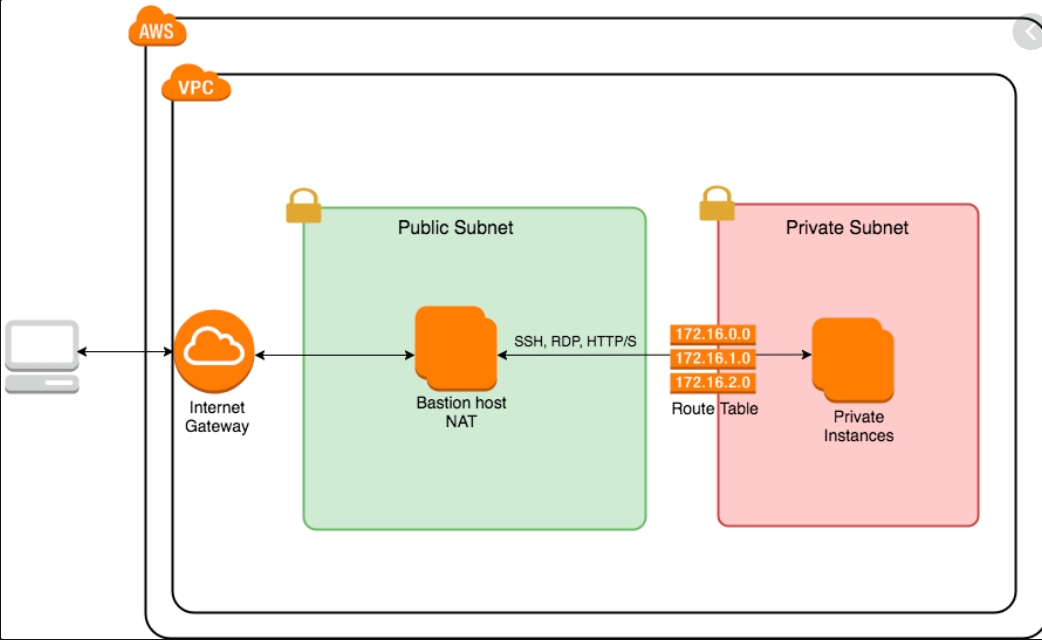
  Create a custom VPC with public and private subnets and run EC2 instances on it. In this blog we will use AWS CLI version2 to create a custom VPC  along with private and public subnets and finally we will run new EC2 instances on this VPC. To begin with, let's create a VPC with name as paulVPC2 and CIDR-Block range as 192.168.0.0/16 using below aws cli command aws ec2 create-vpc ^ --cidr-block 192.168.0.0/16 ^ --tag-specifications="ResourceType=vpc,Tags=[{Key=Name,Value=paulVPC2}]" The symbol '^' is used in windows for line continuation similar to '\' in linux. To get the vpc-id of the above VPC use below aws cli command aws ec2 describe-vpcs ^ --output json In this VPC we will create a subnet with name=paulSubnet1 in Mumbai 1a AZ aws ec2 create-subnet ^ --cidr-block 192.168.1.0/24 ^ --vpc-id vpc-0855a7ab2ac29fb28 ^ --availability-zone ap-south-1a ^ --tag-specifications="ResourceType=subnet,Tags=[{Key=Name,Value=paulSubnet1}]" Insid...

Create and attach an aws EBS volume

Image
Hello everyone, today we are going to create an aws EBS volume and attach it to a running aws  EC2 instance. This volume then can be used to store persistent data like we use a pen drive to store data. As per AWS,  Amazon Elastic Block Store (Amazon EBS) provides block level storage volumes for use with EC2 instances. EBS volumes behave like raw, unformatted block devices. You can mount these volumes as devices on your instances. EBS volumes that are attached to an instance are exposed as storage volumes that persist independently from the life of the instance. You can create a file system on top of these volumes, or use them in any way you would use a block device (such as a hard drive). You can dynamically change the configuration of a volume attached to an instance. So let's login to your AWS account and open EC2 service . Scroll down and click on Elastic Block Store and then Volumes . Now Click on Create Volume button to create a new EBS volume In the next page Select th...

How to create an AWS EC2 instance

Image
In this blog we are going to create an AWS EC2 instance. As per AWS,  Amazon Elastic Compute Cloud (Amazon EC2) is a web service that provides secure, resizable compute capacity in the cloud. It is designed to make web-scale cloud computing easier for developers. Amazon EC2 offers the broadest and deepest compute platform with choice of processor, storage, networking, operating system, and purchase model. So first login to your AWS account and then go to EC2 Services . Click on Launch instances and select your Amazon machine Image . AMI is the type of OS that you want to boot in your ec2 instance. Amazon offers rich flavours of OS from Linux servers to Windows servers. Now Choose an Instance type . Instance type is the specification of compute capacity like amount of RAM & CPU. t2.micro is the only instance type that comes under free tier. For all others amazon will charge. Next Configure instance details like number of instances that we want to boot, aws region ( Subne...

AWS EC2 instance with custom security group rules

Image
Hello all, Today we are going to create an AWS EC2 instance with customized rules in security group that allow only specific hosts to connect to it and ping it. So first login to your AWS account and select a region where you want to create an EC2 instance. I am going to use Mumbai region (ap-south-1) . Next click on Launch instances button and below page will appear: Select any AMI [Amazon Machine Image] of your preferences, I am selecting  Amazon Linux 2 AMI . Then select the instance type from below webpage, I will choose t2.micro and click on Next button In instance details page either you can choose default values and click on Next or you can configure some options. I am selecting Subnet option as Default in ap-south-1a and clicking on Next button.   In Add Storage page give size as per your requirement. I'll go with the default option [8 GiB]. In the next page we can add tags to this instance so we can refer to this instance using this tags. We can add multiple ...